Check, Verify and Download Tamil Nadu Land Records
Patta Chitta Online – Check, Verify and Download Tamil Nadu Land Records
Patta Chitta Online is a digital land record service that helps people of Tamil Nadu access important property information online. With the help of the official Patta Chitta portal, landowners and buyers can check ownership details, verify land records, view survey information, and download relevant documents without having to repeatedly visit government offices.
Currently, the Patta Chitta Online system enables users to retrieve land specifics, monitor application status, access Field Measurement Book (FMB) sketches, and quickly obtain land-related data.
Whether you are a landowner, property buyer, farmer, or real estate investor, understanding Patta Chitta records is mandatory before making any land transaction. This guide explains Patta Chitta Online, including its benefits, required documents, application process, download methods, verification steps, and related records such as EC, FMB, and TSLR.
What is Patta Chitta?
Patta Chitta is an important land record used in Tamil Nadu. It helps people check information about a piece of land and its owner. These records are managed by the land office and are used for property verification, land transactions, and ownership confirmation.
In the past, Patta and Chitta were separate documents. Today, both records are available together through the Patta Chitta Online system. This makes it easier for citizens to access land information from anywhere. People can use these records to verify ownership details and confirm land classification.
A Patta is an official document that shows who owns a piece of land. It is issued by the government and contains important details about the property. The Patta serves as proof of ownership and is often required for various property-related activities.
A Patta usually includes information such as:
- Name of the landowner
- Patta number
- Survey number
- Subdivision number
- Area of the land
- Location of the property
The Patta document is important when buying, selling, or transferring land. It may also be required when applying for loans, updating land records, or resolving ownership issues.
Today, users can check Patta details online through the Patta Chitta portal, making ownership information easier to access.
Chitta is another land record that provides information about the type and classification of land. It helps identify whether the land is used for residential, agricultural, or other purposes.
The Chitta document generally contains details such as:
- Type of land
- Land classification
- Survey information
- Village details
- Property-related records
Chitta records help people understand how a piece of land is categorized. This information can be useful when buying property, applying for government services, or verifying land details.
Today, Patta and Chitta information is available together through the Patta Chitta Online system, making property verification easier.
Patta Chitta Services
Several online services help users access important land and property information. These services make it easier to check records, verify ownership details, and obtain property documents.
The table below lists some of the most popular services.
| Service Name | Quick Access |
|---|---|
| 📄 A-Register Extract | View Service → |
| 🏢 TNREGINET | View Service → |
| 🗺️ FMB Sketch View | View Service → |
| 🌐 E-Services Portal | Visit Portal → |
| 🏠 TSLR Extract | View Service → |
Each service provides different information related to land and property records. Users can choose the service they need to access specific details and complete property-related tasks more easily.
Benefits of the Patta Chitta System
The Patta Chitta system in Tamil Nadu helps people access land information easily. It keeps important records in one place and makes property details simple to check. Many people use these records before buying, selling, or managing land.
Some of the main benefits are:
| Benefit | Description |
|---|---|
| Easy Access to Land Records | People can view land information without having to visit many government offices. This saves time and effort. |
| Helps Prove Ownership | The records show who owns a piece of land. This helps people confirm ownership when needed. |
| Reduces Land Disputes | Clear records can help avoid confusion about property ownership. They also help solve land-related issues more easily. |
| Saves Time | Users can check important details quickly. They do not have to spend hours searching for information. |
| Supports Property Transactions | These records are useful when buying, selling, or transferring land. They help people verify property details before making decisions. |
| Better Transparency | The system makes land information easier to view. This helps people access correct and updated records. |
| Useful for Farmers | Farmers can use land records to confirm details about their fields and agricultural land. |
| Easy Verification | People can check survey numbers, ownership details, and other property information in a simple way. |
| Helps with Government Services | Land records may be needed for certain government services, applications, and property-related tasks. |
| Safe Record Keeping | Important land information is stored in an organized manner. This helps protect records and makes them easier to find when required. |
Overall, the system makes it easier for citizens to access land information, verify property details, and manage land-related work with less effort.
Patta Chitta vs EC vs FMB vs TSLR
Land records help people learn more about a property. Different records give different types of information. Some records show who owns the land. Others show land maps or land details. The most common records are EC, FMB, and TSLR.
Each document has a different purpose. Knowing about these records can help people check property details before buying or selling land.
What is EC?
EC stands for Encumbrance Certificate. It is an important property document. It shows the history of a property for a selected period.
An EC can help people know if a property has been sold, transferred, or used for a loan. Many people check this document before buying land or a house.
An EC may contain:
- Property transaction details
- Ownership changes
- Sale records
- Mortgage information
- Registration details
This document helps people make safer property decisions. It can also help them avoid problems in the future.
What is an FMB Sketch?
shapFMB stands for Field Measurement Book. An FMB Sketch is a map of a piece of land. It shows the e and size of the property.
This sketch helps people understand land boundaries. It also shows the location of the land and nearby plots.
An FMB Sketch may include:
- Land boundaries
- Survey number
- Measurements of the land
- Shape of the property
- Nearby land details
People often use this sketch when checking property information. It can also help during land surveys and property verification.
The sketch makes it easier to understand where a piece of land begins and ends.
What is TSLR?
TSLR stands for Town Survey Land Register. It is a land record used mainly for properties located in towns and cities.
This record contains important details about urban land. It helps people check ownership information and property records.
A TSLR record may include:
- Owner details
- Property number
- Survey details
- Land area
- Property location
This document is useful when people want to verify information about land in urban areas. It helps keep property records organized and easy to access.
Difference Between EC, FMB, and TSLR
| Record | Purpose / Information |
|---|---|
| 📜 EC | Shows the history of property transactions. |
| 📐 FMB Sketch | Shows a map and measurements of the land. |
| 🏙️ TSLR | Contains information about town and city properties. |
📌 Important Information
These records are different from each other.
Each record gives different details about a property. Together, they help people understand ownership, boundaries, and property history.
Checking these records can help people make better decisions when buying, selling, or managing land. They also make it easier to verify property information and avoid confusion about land details.
How to Download Patta Chitta Online
You can download land records online by following these simple steps.
Step 1: Visit the Official Website
Visit the official Patta Chitta website, eservices.tn.gov.in, using your phone, tablet, or computer.
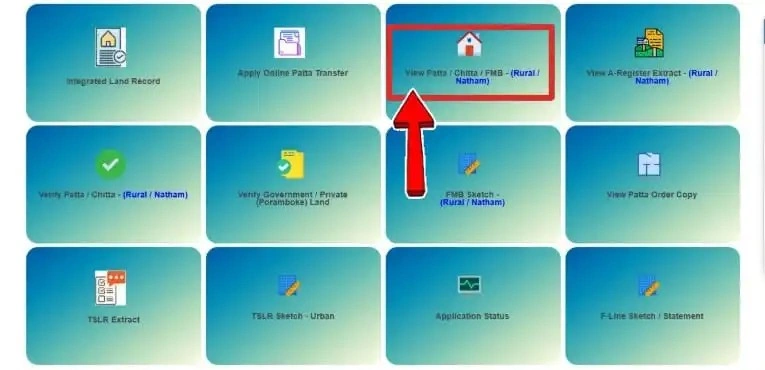
Step 2: Select the Required Service
Choose the option to view land records or property details.
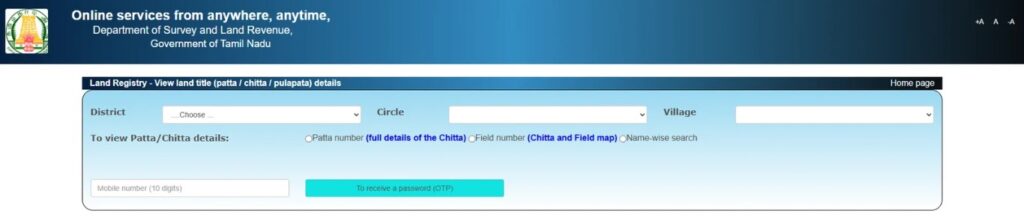
Step 3: Enter Location Details
Select your district, taluk, and village from the list.
Step 4: Enter Property Information
Enter the survey number or other required land details.
Step 5: Verify the OTP
Enter the OTP sent to your mobile phone. After entering the OTP, click the Verify button.
Step 6: Submit the Information
Check the details you entered and click the Submit button.
Step 7: View the Record
The land record will appear on the screen. You can check ownership details, survey information, and other property data.
Step 8: Save or Print the Record
If needed, save the record or print a copy for future use.
By following these steps, users can quickly access land information and verify important property details online.
Documents You'll Need to Apply for Patta Chitta
📄 Identity Proof
You may need a valid ID to confirm your identity and ensure the application is submitted by the correct person.
🏡 Property Details
Keep land information ready, including survey number, patta number, and other property-related records.
📍 Address Proof
Address verification documents may be required to confirm your location and contact details.
📱 Registered Mobile Number
A valid mobile number is often required for OTP verification, updates, and status notifications.
📑 Ownership Documents
Keep property ownership documents available to support and verify your application.
🗺️ District, Taluk & Village Details
Provide accurate location information so the system can identify the correct land records.
⚠️ Important Note
Make sure all information is accurate before submitting your application. Incorrect details may delay the process or make it difficult to locate the correct land records.
How to Apply for Patta Chitta Online
🌐 Visit Website
Open the Patta Chitta portal.
🔐 Login / Register
Sign in or create a new account.
📋 Select Service
Choose Patta Application or Transfer.
🏡 Enter Details
Fill property and land information.
📤 Upload Documents
Upload required supporting files.
✅ Review & Submit
Verify information and submit.
💾 Save Number
Keep the application reference safe.
🔍 Check Status
Track your application progress.
How to Transfer Patta Chitta Online
You can transfer land ownership records online by following a few simple steps. Before you begin, keep your property details and required documents ready.
| Step | What You Need to Do |
|---|---|
| Step 1 |
Visit the Official Website Open the official portal and go to the Patta Transfer service. |
| Step 2 |
Enter Property Details Fill in the required information, such as the district, taluk, village, survey number, and ownership details. |
| Step 3 |
Select the Reason for Transfer Choose the reason for the transfer. This may be due to a property sale, inheritance, gift, or another ownership change. |
| Step 4 |
Upload Required Documents
✓ Aadhaar Card or Voter ID ✓ Encumbrance Certificate (EC) ✓ Sale Deed ✓ Address Proof ✓ Proof of Possession ✓ No Objection Certificate (if required) ✓ Death Certificate (for inheritance cases) |
| Step 5 |
Pay the Required Fee Complete the payment using the available online payment options. |
| Step 6 |
Submit the Application Check all details carefully and submit your request. |
| Step 7 |
Save the Application Number After submission, you will receive an application or reference number. Keep it safe for future use. |
| Step 8 |
Check the Application Status Use your application number to track the progress of your request online. |
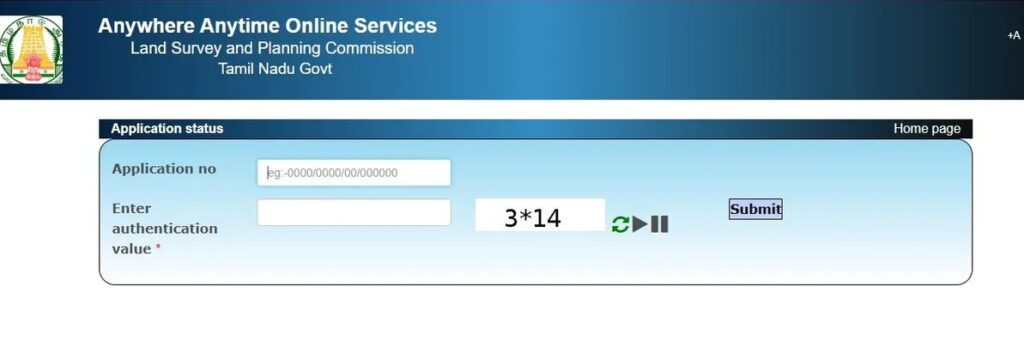
How to Check Patta Chitta Online Status
Checking the status of your application is simple. You can find out whether your request has been approved, is under review, or is still pending.
Follow these steps to check your status:
Step 1: Visit the Official Portal
Open the official website by clicking eservices.tn.gov.in.
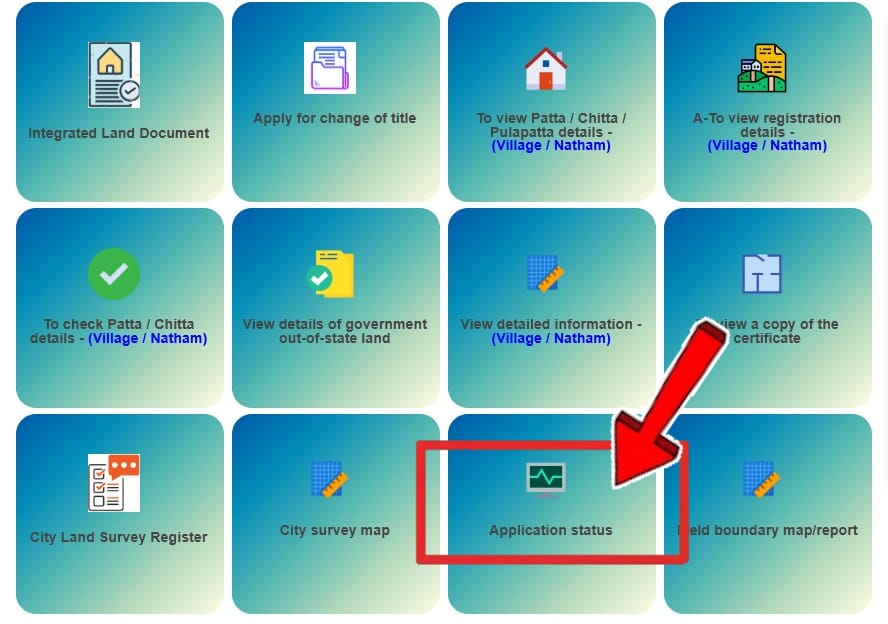
Step 2: Select the Status Check Option
On the homepage, click the option for Verify Patta / Chitta.
Step 3: Enter Your Application Details
Type your application number or reference number in the required field. Make sure the information is correct.
Step 4: Complete Verification
If the portal asks for verification, enter the required details and continue.
Step 5: Submit Your Request
Click the submit button to proceed.
Step 6: View Your Application Status
Your application status will appear on the screen. The result may show:
- Approved
- Pending
- Under Review
- Rejected
Step 7: Save the Status Details
You can save or print the information for future reference if needed.
Charges
Most services on the portal are free to use. However, some applications and special requests may require a small fee. The amount depends on the service you choose.
The table below shows the common charges for different services.
| Service | Fee |
|---|---|
| 📄 Viewing Patta / Chitta / TSLR | FREE |
| 🗺️ Viewing FMB Sketch | FREE |
| 📥 Downloading Patta / Chitta / TSLR Extract | FREE |
| 📥 Downloading FMB Sketch | FREE |
| 🔄 Patta Transfer Application | ₹100 – ₹300 |
| 🏢 Service Charge at CSCs | ₹25 – ₹60 |
Service charges may change from time to time. Before making any payment, check the latest fee details on the official portal. It is also a good idea to keep your payment receipt safe for future use.
Importance of TNREGINET
TNREGINET is an online portal created by the Government of Tamil Nadu. It helps people access different property and registration services from one place. Instead of visiting government offices for every task, users can use the portal to find important information and complete many services online.
The portal is useful for property owners, buyers, sellers, and people who want to check land-related records. It provides easy access to several services connected to land and property management. Many users also use TNREGINET along with TN Patta records to verify property information before making important decisions.
Why is TNREGINET Important?
TNREGINET makes property-related work easier and faster. People can access information from their homes without spending too much time visiting different offices.
| Feature | Benefit |
|---|---|
| 🏡 Easy Access to Property Information | The portal allows users to find important property details online. This helps people get information quickly whenever they need it. |
| ⏱️ Saves Time and Effort | Many services can be accessed through the internet. This reduces the need for long visits to government offices and helps users save time. |
| 🔍 Better Transparency | The portal makes important information easier to access. This helps users view records and verify details more easily. |
| 🏠 Helpful for Property Buyers | Before buying land or property, many people check different records to verify information. The portal helps users find details that may be useful during this process. |
| 💻 Supports Online Services | Several registration and property-related services are available online. This makes the process more convenient for citizens. |
| ✔️ Helps Verify Records | Users can use the portal to check and confirm different types of property information. This helps reduce confusion and improves accuracy. |
| 🌾 Convenient for Landowners | Property owners can use the portal to access information related to their land and records whenever required. |
| 📱 Easy to Use | The website is designed to help users access services in a simple way. People can search for information and complete tasks by following a few basic steps. |
Official Support and Assistance
You can use the following official contact details if you need assistance regarding land records or survey-related services in Tamil Nadu.
| Service Details | Information |
|---|---|
| 🏢 Office Name | Commissionerate of Survey and Settlement |
| 📍 Address | No. 1, Survey House, Kamarajar Salai, Chepauk, Chennai – 600005 |
| 📧 Official Email ID | [email protected] |
| 🌐 Official Web Portal | eservices.tn.gov.in |
| ☎️ Helpline | 1100 |
| 📞 Contact Number | 042-111-22-22-77 |
Frequently Asked Questions (FAQ)
Conclusion
📌 Conclusion
Patta Chitta Online makes it easier for people to access important land records in Tamil Nadu. It helps users check property details, verify ownership information, view land records, and complete different land-related tasks from their homes.
In this guide, we learned about Patta and Chitta records, their benefits, and the documents that may be needed during the application process. In addition, we discussed other important records such as EC, FMB Sketch, and TSLR, which provide useful information about a property.
We also explored the importance of TNREGINET and how it helps users access different property and registration services online. Together, these services make it easier for citizens to manage property-related work and find the information they need.
Before buying, selling, or managing land, it is always a good idea to verify property records and review the available information carefully. By using online land services, users can access accurate records, make informed decisions, and complete property-related tasks more conveniently.